
Multi-Tenancy in React Native: Building Multiple Apps from One Codebase using Turborepo and Expo
At EF World Journeys, we operate three distinct travel brands: Go Ahead Tours, EF Adventures, and Ultimate Break.

Each brand has its own visual identity, marketing voice, app store presence, and loyal customer base. What they share is almost everything under the hood: trip management, flight tracking, itinerary views, chat with tour groups, payments, excursion booking, and dozens of other features.
Here's how the World Journeys mobile app team handles designing and maintaining 3 separate apps on the iOS App Store and Google Play Store, all under one codebase.
Table of Contents
The Problem
When you first encounter the multi-tenant problem, the obvious solutions seem reasonable:
Option 1: Separate Codebases
Fork the app three times. Each team maintains their own version. This works until you realize that:
A bug fix needs to be applied three times
New features require triple the development effort
Drift becomes inevitable - the apps slowly diverge in ways that make future consolidation nearly impossible
Engineers get bored fixing the same bug in three places
Option 2: Feature Flags Everywhere
Keep one codebase but sprinkle if (brand === 'GAT') , etc checks throughout. This works until:
Your components become unreadable spaghetti of business specific logic
Testing combinations explodes exponentially
You're terrified to change anything because you don't know what tenant-specific behavior you might break
Option 3: White-Label Configuration
Make everything configurable via JSON or environment variables. This works until:
You need tenant-specific behavior, not just colors
You realize SVG illustrations, Lottie animations, and complex UI can't be "configured"
The configuration file becomes its own unmaintainable monster
What We Actually Needed
Our requirements were specific:
Three distinct apps with separate bundle identifiers, app store listings, and update channels
Tenant-specific visuals: themes, icons, illustrations, animations, copy
Shared business logic: screens, navigation, API calls, state management
Type safety: if we add a new theme token, the compiler should force us to implement it for all tenants
Single test suite: write tests once, run them with confidence across tenants
Developer experience: being able to spin up a dev server for any tenant, all from one codebase
Architecture Overview
We use NPM Workspaces to link internal packages and Turborepo to orchestrate tasks across them. The root of the project is called wojo-app , and all subprojects inherit from the root.
The root package.json is as follows:
1{2 "name": "wojo-app",3 "workspaces": [4 "apps/*",5 "packages/*"6 ],7 "scripts": {8 "gat:start": "dotenv -- turbo run start --filter @wojo/gat-app",9 "adv:start": "dotenv -- turbo run start --filter @wojo/adv-app",10 "ub:start": "dotenv -- turbo run start --filter @wojo/ub-app",11 ...12 }13}This allows a developer to start the Expo dev client for a specific tenant with one command.
What lives where
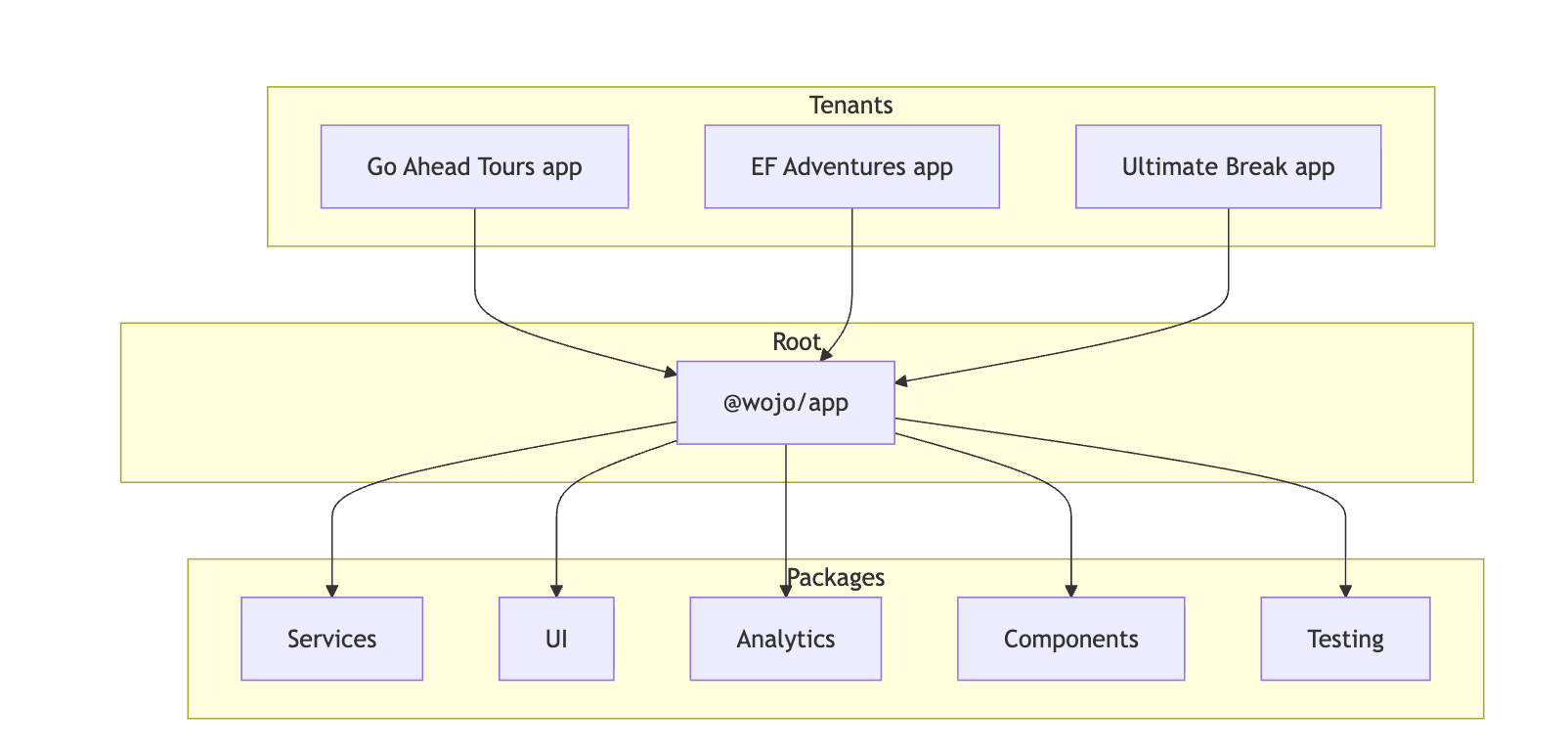
Packages never import from apps and the dependency arrow only points downward. In other words, anything below the apps is completely tenant agnostic.
Each app contains only tenant specific assets and configurations. This is a snapshot of the directory structure of a tenant:
1apps/gat-app/2├── App.tsx # ~45 lines - just wires things up3├── app.config.ts # Expo config (bundle ID, icons, etc.)4├── eas.json # EAS Build configuration5├── assets/6│ ├── branded-images/ # Brand-specific PNGs, SVGs7│ ├── branded-animated-images/ # Lottie files8│ ├── localized-content/ # Brand-specific strings9│ │ ├── prod/10│ │ │ ├── en.ts # English base strings11│ │ │ ├── en-US.ts # US-specific overrides12│ │ │ └── en-CA.ts # Canada-specific overrides13│ └── settings/14│ └── BusinessSettings.ts # Runtime config for this tenantDependency Injection
The heart of our multi-tenancy architecture is dependency injection via React Context. This allows tenant specific content to be injected into components without the consumer having any knowledge of what the underlying data is.
A sample of the injection interface is shown below:
1export type AppProps = {2 assets: {3 brandImages: ImageAssets;4 };5 businessSettings: AppBusinessSettings;6 localization: Record<string, any>;7 clientName: string;8 theme: {9 dark: Theme;10 light: Theme;11 };12};Each app provides an implementation of this interface:
1const App = () => (2 <RootApp3 clientName="gat-app"4 assets={{ brandImages}}5 localization={{ en, en_US, en_CA }}6 businessSettings={businessSettings}7 theme={{ dark, light}}8 />9);Theming
Let's walk through how a component receives the theming colors for a specific tenant.
We use ThemeProvider from Emotion to make tenant colors, typography, spacing, and component styles available throughout the app.
1// Inside RootApp2<ThemeProvider3 theme={scheme === "dark" ? theme.dark : theme.light}4>5 {children}6</ThemeProvider>Each tenant provides complete light and dark theme objects that confirm to our theme types, such as this one
1export const light: GATTheme = {2 darkMode: false,3 palette: {4 primary: {5 main: "#57a197", // GAT's signature teal6 accent: "#89bdb6",7 dark: "#468179",8 },9 // ... full palette10 },11 colors: {12 brand: "#378712", // GAT brand green13 green: {14 darkest: "#103B30",15 dark: "#164e3e", // GAT's deep green16 // ...17 },18 // ... all color definitions19 },20 global: globalTheme,21 semantic: semanticLight,22 component: componentLight, // Button colors, alert styles, etc.23};24
A component consumes it using the useTheme() hook and passing the tokens directly to the styles, like so:
1import { useTheme } from "@emotion/react";2
3export const PrimaryCard = ({ children }) => {4  const theme = useTheme();5  6  return (7    <View style={{8      backgroundColor: theme.semantic.color.surface.primary,9      borderRadius: theme.semantic.borderRadius.background.standard,10      ...theme.semantic.shadows.standard.default,11    }}>12      {children}13    </View>14  );15};
CI/CD
One of the trickiest parts of the multi-tenant architecture is deployment. We leverage GitHub Actions, EAS (Expo Application Services) and more to create a flexible pipeline that can build all the tenants for all the platforms.
Testing
On PR open (and any subsequent commits to the git branch), a GitHub Workflow starts that, after running common actions such as linting, typecheck and our test suite, publishes updates for all the tenants using EAS Update. Using a matrix strategy to run multiple jobs from one workflow, the pipeline is able to spawn up workers that automatically deploy a new EAS branch based on the name of the PR.
1 eas update --auto \2 --branch="${{ github.event.pull_request.head.ref }}" \3 --message="Update with commit ${{ github.sha }}" \4 --non-interactiveThen, any member of the team who wishes to test the PR can simply navigate to the branch in their dev client, which pulls down the changes directly to their device and allows them to QA and verify the changes.
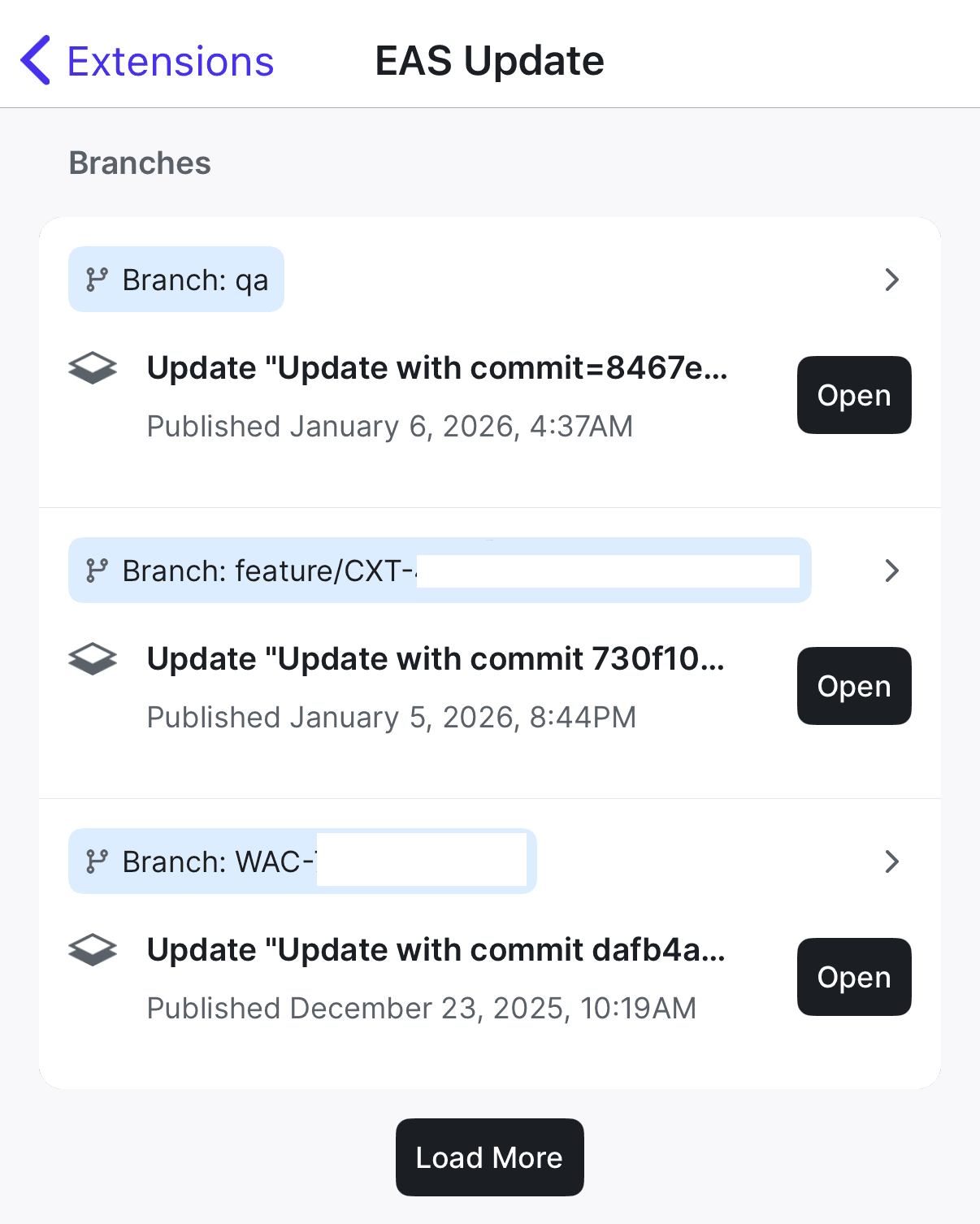
Note: This technique doesn't work if the PR contains native changes (such as new packages, or interactions with the underlying iOS / Android APIs). For those scenarios, a new native build is require before team members can QA the branch
Publishing to the App Store
EAS allows us to do something similar to automate our app store publishing and release workflows. When a production build is triggered via a workflow dispatch, all the usual checks happen, and then eas build is run with the --auto-submit flag, which does the following:
For iOS: Uploads to App Store Connect + TestFlight
For Android: Uploads to Google Play Console + Internal Testing track
No manual uploads, no XCode, no Google Play Console.
Versioning
All three tenants share the same version number, defined in package.json. While our strategy would allow for different tenants to diverge and be updated separately, we don't do this for a few reasons:
Simplifies support: "What version are you on?" → Same answer regardless of tenant
Easier release coordination: All tenants move together
Prevents confusion: No need to track "X is on 1.2.3, Y is on 1.3.1, Z is on 1.1.9"
Conclusion
If you're facing a similar challenge—multiple products, shared functionality, distinct identities—this architecture might be your answer. The initial investment pays dividends in velocity, quality, and peace of mind. And when your team ships a critical fix to three production apps in under two hours on a Friday afternoon, you'll know it was worth it.
Want to learn more? Reach out to the World Journeys engineering team or connect with us on LinkedIn